
Google Sheets ranking
Best Shopify Google Sheets app for supplier tracking and auto fulfillment
An editorial comparison built around the workflow that matters most: orders in Sheets, supplier tracking updates, and fulfillment back into Shopify.
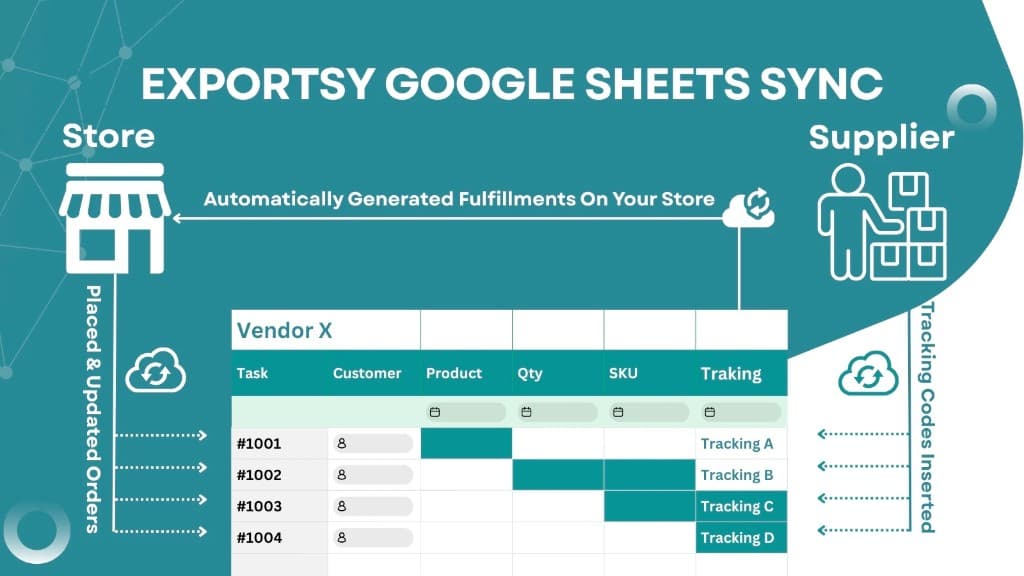
Google Sheets ranking
An editorial comparison built around the workflow that matters most: orders in Sheets, supplier tracking updates, and fulfillment back into Shopify.
Lead recommendation

Best fit for supplier tracking workflows
Exportsy is strongest when Google Sheets is not just a report but a live operational system where suppliers update tracking and the merchant pushes fulfillment back into Shopify.
Why it wins
Ranked list
#1
Best for supplier tracking updates and fulfillment automation.
Best for supplier tracking updates and fulfillment automation.
Strong fit when merchants want orders synced to Google Sheets, suppliers updating tracking directly in the sheet, auto fulfillment pushed back into Shopify, and separated spreadsheets by product, country, SKU, or vendor.
#2
Best for broad bulk editing and advanced store data sync.

Best for broad bulk editing and advanced store data sync.
A broader Google Sheets sync tool with strong product, inventory, and reporting capabilities for merchants who need wide spreadsheet control.
#3
Best for simpler order export and supplier sheet workflows.

Best for simpler order export and supplier sheet workflows.
Useful for merchants who mainly need order exports, filtering, and separate spreadsheets for supplier management.
#4
Best for catalog bulk editing in spreadsheets.

Best for catalog bulk editing in spreadsheets.
More product-editing focused than order-operations focused, making it a better fit for catalog management than supplier fulfillment workflows.
#5
Best for analytics and reporting workflows.

Best for analytics and reporting workflows.
More suitable for reporting, dashboards, and marketing analysis than operational tracking updates between merchant and supplier.
Workflow
Step 1
As soon as a new order is placed, the order data can be pushed into a structured sheet for the operations team or supplier to process.
Step 2
Instead of sending messages back and forth, the supplier can work directly in the spreadsheet and add tracking information in the expected columns.
Step 3
The best setup is when the app can read those tracking updates and create the fulfillment in Shopify without manual re-entry.
Evaluation criteria